From idea to market-ready product, our SIGNS solutions make every stage easier, faster. Discover How We Help

Views: 222 Author: Landea Signs Publish Time: 2026-05-05 Origin: Site


When I first walked a U.S. client's facility with a tape measure in one hand and a stack of "ADA compliant" signs in the other, I realized something important: most non-compliance issues come from details, not from bad intentions. Many brands invest in beautiful signage, but miss basic ADA rules on height, contrast, or Braille placement—and that is where lawsuits, fines, and poor user experience begin. [parallaxdigital]
For overseas OEM partners like our factory in China, understanding ADA signage requirements is no longer "nice to have"; it is essential to supplying compliant products for U.S. projects in retail, healthcare, hospitality, education, and corporate workplaces. This guide combines official standards with real-world lessons from sign audits and global manufacturing so you can brief your suppliers clearly, avoid expensive rework, and create an inclusive environment that actually works for people with disabilities. [schwaab]

The Americans with Disabilities Act (ADA) is a federal civil rights law that prohibits discrimination against people with disabilities in employment, public services, and public accommodations. It sets detailed design rules for buildings, circulation routes, and especially signage so that people with visual, mobility, or cognitive impairments can navigate spaces independently and safely. [speedpro]
For signage, the key technical reference is the ADA 2010 Standards for Accessible Design, which define where signs are required, what they must look like, and how they must be mounted. These standards are enforced through building inspections, fire and life-safety reviews, and—when things go wrong—by litigation. [adacentral]
In practice, accessibility means a person with low vision can follow clear directional signs, a wheelchair user can find the correct restroom quickly, and a blind visitor can read room IDs using tactile letters and Braille at a predictable height. When those basics fail, the experience becomes stressful and unsafe, even if the building looks "finished" to everyone else. [napadasigns]
From an operator's point of view, accessible signage reduces staff interruptions, improves wayfinding, and lowers liability risk. For multi-site brands, it also creates a consistent experience—your store, clinic, or campus "feels the same" to customers with disabilities, no matter the location. [plattsburghcreativesigns]
Under ADA standards, not every sign in a building has to be compliant—but certain categories absolutely do. Key requirements include: [plattsburghcreativesigns]
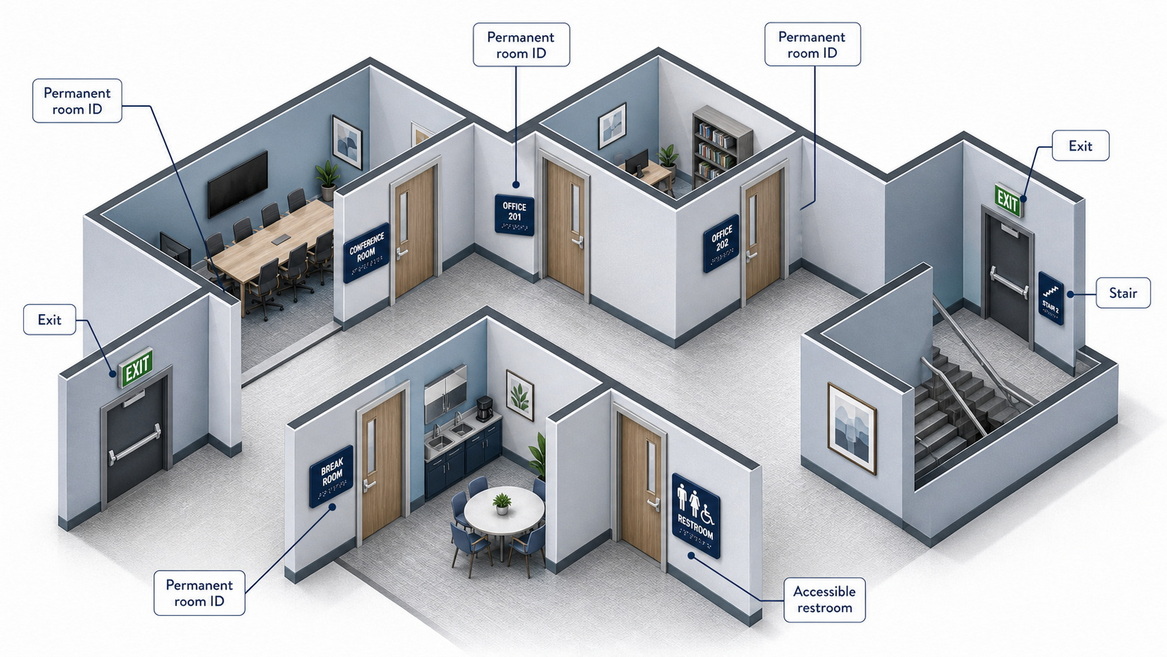
- Permanent room identification: Restrooms, offices, stairways, kitchens, electrical rooms, storage rooms, mechanical rooms, and any room whose function is not likely to change. [schwaab]
- Exits and emergency exits: Exit doors, areas of refuge, and related life-safety locations. [speedpro]
- Elevators and lifts: Car identification, control panels, and required instructions have detailed tactile and Braille rules. [adacentral]
- Accessible routes and facilities: Signs marking accessible entrances, restrooms, and parking must follow visual and tactile standards, often with the International Symbol of Accessibility (ISA). [georgeandwilly]
These signs typically require tactile (raised) characters, Grade 2 Braille, high contrast, non-glare finishes, and specific mounting locations. [identiti]
Some signs are functionally important but are not required to meet full tactile and Braille rules. Examples include: [plattsburghcreativesigns]
- Temporary signs (used for less than 7 days, or short-term notices)
- Menu boards, posters, marketing graphics, and purely decorative signs
- Changeable conference room signs, where room names or functions change frequently
- Large overhead directional signs that are already paired with compliant tactile signs at doorways
That said, best practice is to keep good visual contrast, clear fonts, and logical placement even on non-ADA signs, so the user experience remains consistent and inclusive. [adamsigns]
When we design OEM ADA signage kits for U.S. clients, we always start from four technical pillars: finish, contrast, typography, and tactile/Braille details.
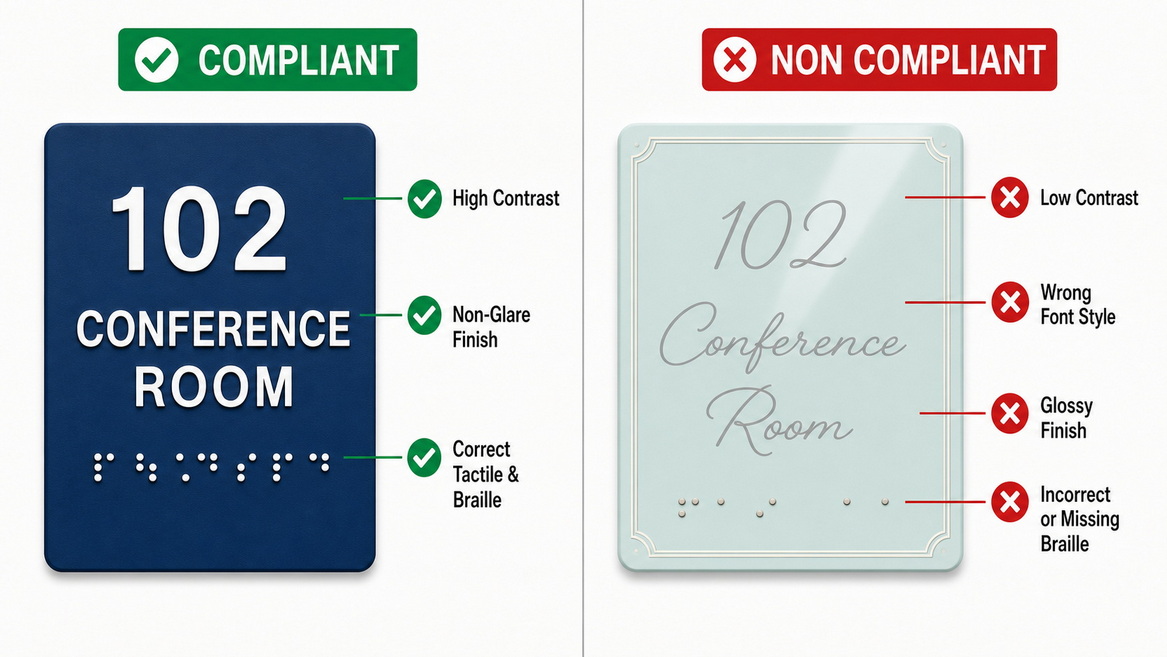
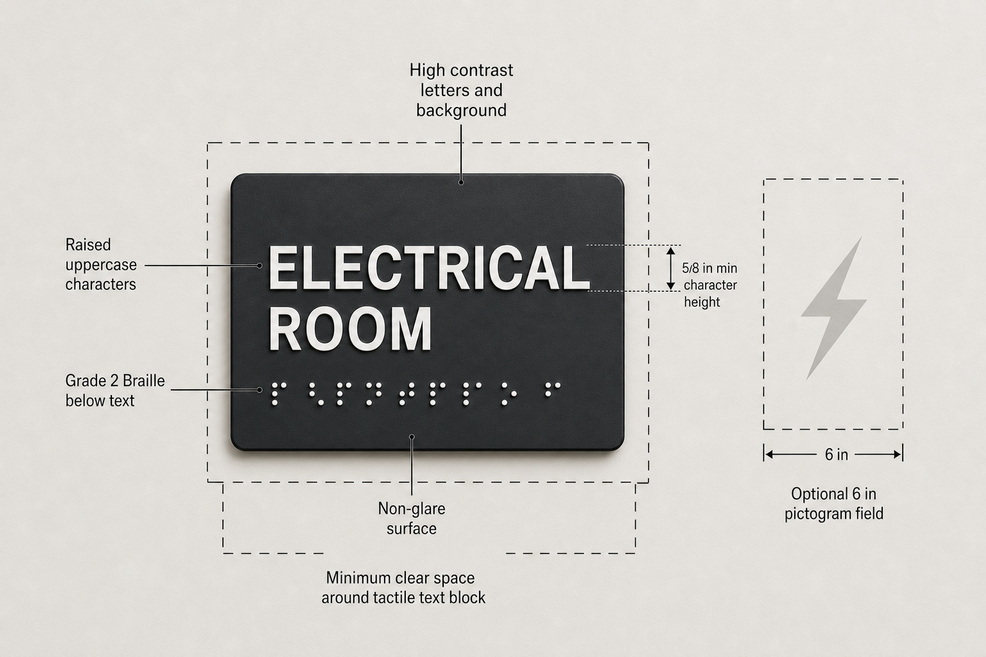
ADA-compliant signs must have a non-glare finish—typically matte or eggshell—so light does not bounce off and blind low-vision users. Glossy acrylic, glass, or metal can be used only if the actual text panel has a non-glare layer or insert. [napadasigns]
Color contrast is equally critical. Most ADA design resources recommend at least around 70% brightness difference between characters and background, such as light text on a dark panel or vice versa. This is why black on white, white on dark blue, or gold on charcoal are so common in compliant signage systems. [speedpro]
The ADA sets rules for character height, proportions, and font style to ensure readability at typical viewing distances. Key points: [identiti]
- Use sans serif typefaces (e.g., Helvetica, Arial, Futura); avoid script, decorative, condensed, or italic fonts for tactile characters. [napadasigns]
- Tactile text is in uppercase, with height between about 5/8 inch and 2 inches, depending on viewing distance. [identiti]
- Stroke thickness should be under roughly 15% of character height, and letter width should be about 55–110% of height, preventing letters from being too thin or too compressed. [identiti]
- Keep at least around 1/8 inch between adjacent characters to avoid touch confusion and crowding. [identiti]
For visual-only signs (for example, overhead directional signs), sentence case is allowed as long as the font remains clean and highly legible. [adamsigns]
Tactile characters must be raised at least about 1/32 inch above the background so users can read them by touch. When Braille is required, the ADA mandates: [identiti]
- Grade 2 (contracted) Braille
- Dots placed directly below the corresponding text, on separate lines
- Adequate vertical spacing so fingers can move comfortably across the line [plattsburghcreativesigns]
Proper Braille positioning and consistency are the most common manufacturing errors we see in non-U.S. factories, so this is an area where you should insist on specialized ADA production experience from your OEM partner.
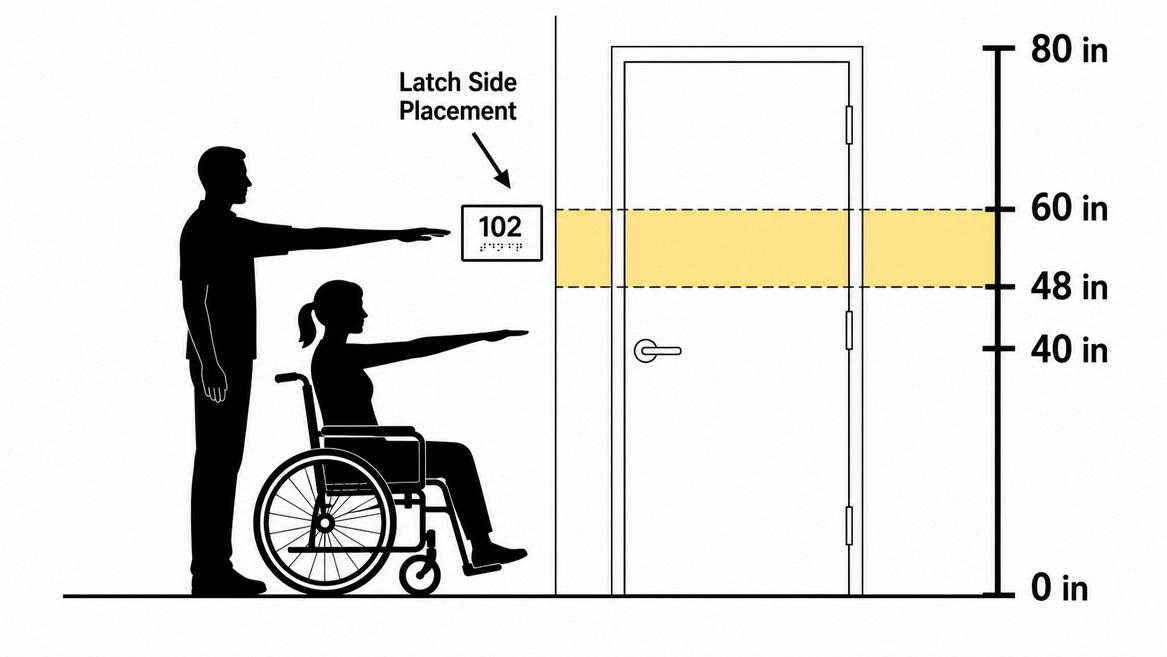
The original article you provided correctly notes that ADA tactile signs must be mounted so the bottom of the lowest tactile character is at least 48 inches above the finished floor, and the top of the highest tactile character is no more than 60 inches above the floor. This creates a vertical "reading band" that works for both wheelchair users and standing adults. [adacentral]
Some practitioners choose a consistent baseline—for example, positioning the bottom of the sign at approximately 54 inches—to achieve visual alignment across long corridors, as long as the tactile character range remains within the 48–60 inch band. The key is consistency: pick a standard and use it throughout the facility. [parallaxdigital]
For most doors, ADA-compliant signs should be placed on the latch side of the door on the adjacent wall, within a defined reach range and outside of the door swing. If there is not enough space on the latch side, the sign can be mounted on the nearest adjacent wall that is still outside the clear floor space of the door swing. [plattsburghcreativesigns]
For double doors with only one active leaf, the sign may be mounted on the inactive leaf, again respecting the 48–60 inch tactile band. Overhead signs and projecting signs can provide additional visual guidance, but they must be at least 80 inches above the floor and cannot protrude more than 4 inches into circulation paths to avoid creating hazards. [speedpro]
To make this practical, here is how we usually break down ADA signage packages for clients.
| Sign Type | Purpose | Typical ADA Requirements | Example Locations |
|---|---|---|---|
| Room ID | Identify permanent rooms | Tactile text, Grade 2 Braille, high contrast, non-glare finish | Restrooms, offices, storage rooms, stairs plattsburghcreativesigns |
| Directional | Guide people to key spaces | High-contrast visual text and arrows, sometimes pictograms; tactile is often not required | Corridors, lobbies, junctions speedpro |
| Informational | Provide instructions or notices | Clear visual text, good contrast; tactile only if treated as permanent ID | Policies, check-in instructions, equipment notices adacentral |
| Exit & Life Safety | Identify exits and safe paths | High-contrast text, often illuminated; paired with tactile signs at doors | Exit doors, emergency exits, areas of refuge speedpro |
| Accessibility | Mark accessible routes/facilities | Pictograms (ISA), high contrast, sometimes tactile text and Braille | Accessible restrooms, parking, ramps napadasigns |
Working from this matrix, a facility manager can build a room-by-room sign schedule and a manufacturer can quote and produce exactly what is needed.
One of the most effective ways I help clients is by walking their buildings with a simple, repeatable checklist. You do not need special software—just a floor plan and basic tools.
1. List all permanent rooms and spaces. Confirm each has a consistent, easily readable room ID sign that matches the actual use (e.g., "Electrical," "Storage," "Janitor"). [schwaab]
2. Measure sign heights. Check that tactile signs fall within roughly 48–60 inches from finished floor to tactile characters, and that placement is consistent across similar corridors. [adacentral]
3. Check the latch side and clear space. Ensure room ID signs are on the latch side of the door, outside the swing, and reachable without standing in the door path. [speedpro]
4. Evaluate contrast, finish, and fonts. Confirm non-glare panels, strong light–dark contrast, and clean sans serif fonts with no condensed or script styles. [napadasigns]
5. Verify Braille and tactile details. Look for Grade 2 Braille under the text line, raised characters of adequate height, and no spelling or spacing mistakes. [napadasigns]
At the end of this audit, most facilities identify a small list of "high-risk" signs that need replacement and a larger group of directional or decorative signs that would benefit from modernization.
As a factory specializing in advertising signage and architectural wayfinding, we often join projects early to translate design intent into manufacturable, compliant products. From that vantage point, a few practical lessons repeat across projects.
Common issues we see when clients source ADA signage from non-specialist suppliers include:
- Braille dots that are visually correct in renderings but are the wrong size, depth, or spacing when produced.
- Incorrect tactile letter heights because the font was scaled in a design file without checking absolute millimeter dimensions. [identiti]
- Beautiful glossy finishes that look premium in photos but fail non-glare requirements in real spaces. [plattsburghcreativesigns]
- Inconsistent color contrast from batch to batch because no standard reference (e.g., Pantone plus test panel) was agreed.
These problems are avoidable if the buyer shares clear ADA specifications, samples, and test criteria with the OEM manufacturer.
When we work with international brand owners, we recommend including at least the following in your RFQ or purchase documents:
- Reference standard: Clearly state "ADA 2010 Standards for Accessible Design," and, if relevant, local code overlays (e.g., California Building Code). [parallaxdigital]
- Dimensioned drawings: Provide exact tactile character heights, stroke thickness limits, Braille specifications, and pictogram sizes.
- Material and finish specs: Indicate non-glare requirements and acceptable gloss units; define color contrast using Pantone or RAL plus a light–dark combination.
- Mounting method: Confirm whether signs will be surface-mounted, projected, or overhead, and whether hardware must be concealed or tamper-resistant.
- Testing and sampling: Require pre-production samples, including a real Braille sample, for approval before mass production.
With this level of detail, an experienced OEM partner can handle ADA-compliant production reliably at scale, while you stay in control of design and compliance outcomes.
ADA standards themselves change slowly, but enforcement priorities and design expectations continue to evolve. Recent content from industry providers highlights several 2025–2026 focus areas. [boomtownsigns]
- Clearer fonts and simpler layouts. Many inspectors now pay close attention to legibility—avoiding ultra-thin or over-stylized fonts even when they technically fit within stroke rules. [boomtownsigns]
- Stronger contrast and lighting integration. There is growing emphasis on contrast under real lighting conditions, not just in design software mockups. [speedpro]
- All-gender and inclusive restroom signage. Updated restroom standards and social expectations mean more projects specify gender-neutral icons and wording while still meeting tactile and Braille requirements. [georgeandwilly]
- Consistent tactile quality. 2026 resources highlight better tactile character shaping and braille placement to improve comfort and reading accuracy for blind users. [boomtownsigns]
For OEMs and brand owners, the implication is simple: prioritize simplicity, clarity, and inclusivity over decorative complexity. Clean, readable, compliant signs age better and are easier to maintain.
A common concern from designers is that ADA rules will "kill creativity." In practice, the opposite is true: constraints push brands to be clear, confident, and consistent.
To improve user experience and visual appeal:
- Use a limited color palette that meets contrast requirements while reinforcing brand identity (for example, a brand color background with white tactile text and Braille). [adamsigns]
- Group signs visually by hierarchy: primary wayfinding, secondary room ID, and tertiary informational signs should each have a consistent look.
- Keep messages short and plain-language; avoid jargon and abbreviations that confuse visitors or require extra cognitive effort. [schwaab]
If you are planning a new build, remodel, or national rebranding, your signage program is not just decoration—it is a compliance and user-experience system that will be tested every single day by real people. [parallaxdigital]
As a Chinese factory focused on advertising signage and architectural wayfinding, we work directly with overseas brands, wholesalers, and manufacturers to deliver OEM ADA-compliant signage that aligns with both U.S. regulations and your design standards. Our engineering team can review your drawings, recommend compliant dimensions, and prototype key sign types before mass production, helping you reduce risk and keep projects on schedule.
If you want to audit your current signage, develop a standard ADA sign family, or source reliable OEM production for your next project, reach out with your floor plans and brand guidelines—we can help you turn complex ADA rules into a clear, manufacturable signage system.
1. Do all signs in my building need to be ADA compliant?
No. Only signs that identify permanent rooms and spaces, exits, accessible facilities, and certain life-safety features must fully comply with ADA tactile, Braille, and contrast requirements. Temporary notices, menus, and many marketing graphics typically do not require tactile characters or Braille. [adacentral]
2. What is the standard height for ADA signs?
For wall-mounted tactile signs, the lowest tactile character should be at least about 48 inches from the finished floor, and the highest tactile character no more than roughly 60 inches. Overhead signs must generally be at least 80 inches above the floor to avoid creating a hazard. [speedpro]
3. Why is non-glare finish required on ADA signage?
Non-glare (matte or eggshell) finishes reduce reflections from artificial and natural light, making signs easier to read for people with low vision. Glossy surfaces can obscure text and pictograms, especially in corridors with strong downlighting or large windows. [plattsburghcreativesigns]
4. What type of Braille is required on ADA signs?
The ADA requires Grade 2 (contracted) Braille for tactile signs, placed directly below the corresponding text on separate lines. Braille dots must meet specific size, spacing, and height requirements so that blind users can read them reliably by touch. [napadasigns]
5. How can I be sure my overseas OEM supplier is producing ADA-compliant signs?
Ask for dimensioned drawings, real material samples, and fully finished prototypes that include tactile letters and Braille, then verify them against ADA 2010 Standards and local code guidance. Partnering with a manufacturer that specializes in ADA and wayfinding signage, rather than generic decorative signs, significantly lowers your risk of non-compliance. [parallaxdigital]
1. ADA Central – "ADA Signage Requirements: A Quick Guide To Compliance" – overview of ADA signage concepts, sign types, and mounting rules. [web article] [adacentral]
2. Plattsburgh Creative Signs – "ADA Compliant Signs: What Local Businesses Must Know In 2026" – key 2026 specifications for Braille type, character height, mounting height, and contrast. [web article] [plattsburghcreativesigns]
3. Nap's ADA Guide – "Basic Rules For ADA Compliant Signs" – foundational rules on non-glare finishes, high contrast, sans serif typography, and pictogram fields. [web article] [napadasigns]
4. Identiti – "ADA Signage Requirements in 2025: A Compliance Guide for Businesses" – detailed guidance on tactile character relief, font proportions, spacing, and mounting band. [web article] [identiti]
5. SpeedPro – "Sign Requirements Under ADA Accessibility Guidelines" – discussion of size, viewing distance, contrast, and placement for accessible signage. [web article] [speedpro]
6. Schwaab – "ADA Compliance Guidelines" – overview of facilities that require ADA signage and core design elements like non-glare finish, raised letters, graphics, and Braille. [web article] [schwaab]
7. Parallax Digital – "Mastering ADA Signage Requirements: A Complete Guide For Business Owners" – practical installation, maintenance, and audit tips for ADA-compliant signage programs. [web article] [parallaxdigital]
8. Boomtown Signs – "Why Updating To New ADA Standards Matters In 2026" – insights into updated priorities around fonts, contrast, tactile clarity, and restroom signage. [web article] [boomtownsigns]
9. George & Willy – "Bathroom Signage 2026: ADA Compliance, Styles & Tips" – guidance on modern restroom signage design, inclusive icons, and ADA rules. [web article] [georgeandwilly]
10. Adams Signs & Graphics – "ADA Compliant Signage" – explanation of character, contrast, and design principles for accessible interior signage. [web article] [adamsigns]


